Skip to content
Free Delivery on Orders ₹1,999 & Up
BEST SELLER

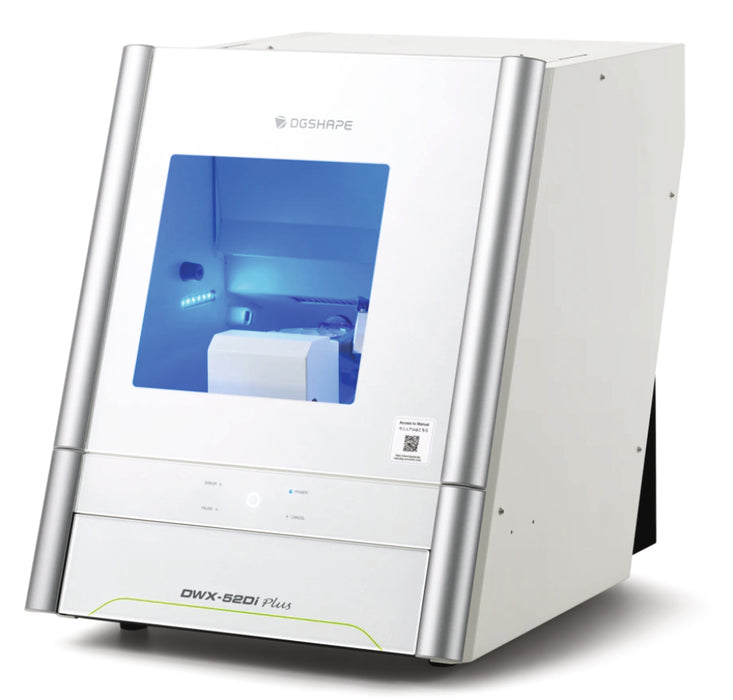
DGSHAPE DWX-52Di Plus 5-Axis Dry Dental Milling Machine

WhatsApp Button Request Price
Warranty Available
GST Invoice Available
Description

DGSHAPE DWX-52Di Plus 5-Axis Dry Dental Milling Machine engineered for precision, speed and versatility. With an upgraded spindle providing 1.9× the gripping power, support for a wide range of materials and sizes, and advanced automation features, it's built to handle demanding dental lab workflows for crowns, bridges, inlays, onlays and more — all with top-tier surface quality and productivity.

Key Specifications

• Supported Materials: Zirconia, Wax, PMMA, Composite resin, PEEK, PEKK, Gypsum, Glass fibre-reinforced resin, CoCr sinter metal, Polycarbonate.
• Loadable Workpiece Shape: External Diameter 98.5 mm, Max Height 60 mm, Step 10 mm, Pin-type diameter 6 mm.
• Axes Speed: XYZ: 6–1,800 mm/min (0.24–70.9 in./min)
• Spindle Motor: Brushless DC Motor
• Spindle Speed: 6,000 – 30,000 rpm
• Rotary Axes Travel: A axis ±360°, B axis ±30°
• Tool Capacity: 15 burs housed, shank diameter 4 mm, length 40-55 mm
• Air Requirement: Compressed air 0.02 to 0.2 MPa
• Interface: USB, Control command set: RML-1, NC code
• Power Requirements: 100-240 VAC ±10%, 50/60 Hz, 2.0 A. Approximate power consumption ~200 W
• Operating Noise: ≤70 dB(A) during operation (when not cutting), ≤45 dB(A) during standby
• Dimensions (W × D × H): 495 mm × 660 mm × 600 mm
• Weight: 67 kg (148 lbs)

Direction To Use

1. Machine Setup
• Place the milling machine on a stable and level surface near the CAD/CAM workstation.
• Connect the power supply and computer interface.
• Turn on the machine and launch the milling control software.

2. Load the Material
• Open the front cover of the machine.
• Insert the zirconia disc or milling block into the disc holder and secure it properly.

3. Design Preparation
• Create or import the dental restoration using CAD software such as exocad or 3Shape Dental System.
• Export the design file and load it into CAM software to generate the milling toolpath.

4. Tool Setup
• Check that the milling burs and tools are correctly installed in the automatic tool changer.
• Ensure the machine is calibrated and ready for milling.

5. Start the Milling Process
• Close the machine cover and start the milling operation from the control software.
• Monitor the milling progress through the machine display or software interface.

6. Remove the Milled Restoration
• After the milling cycle is complete, open the chamber and carefully remove the finished dental restoration from the disc.

7. Cleaning and Maintenance
• Clean the milling chamber and dust collection system.
• Inspect milling tools and replace worn burs if necessary to maintain precision and performance.

Packaging

DGSHAPE DWX-52Di Plus 5-Axis Dry Dental Milling Machine

Warranty

1-year warranty from the date of purchase.

Wide Range of Products
Trusted Global Brands
Best Price Guarantee
100% Genuine Products

Exclusive Deal in just one-click?

Get Bulk Quote →

Frequently Asked Questions

Are the Product genuine and branded?

Yes, they partner with trusted national and international brands and ensure authentic, verified products

Do they deliver across India?

Yes, delivery is available nationwide, including remote areas.

Is it safe to order online from DentalExpress?

Yes, the website uses secure payment gateways and 128-bit encryption to protect transactions and customer data.